ClickHouse MergeTree explained: how the engine really works
MergeTree is the engine that makes ClickHouse fast — and the engine that makes ClickHouse slow when it is misconfigured. Almost every 'ClickHouse is suddenly unusable' incident traces back to a MergeTree design decision that looked harmless on day one: a partition key chosen by habit, an ORDER BY copied from a row-store schema, or a pipeline that inserts one row at a time. This guide builds the mental model, then turns it into concrete rules.
What MergeTree is (and isn't)
MergeTree is a column-oriented storage engine built around one idea: keep data physically sorted on disk so reads can skip almost everything. Each column lives in its own compressed files, sorted by the columns you list in ORDER BY. It is not a B-tree index like Postgres or MySQL — there is no per-row lookup, no uniqueness enforcement, and no transactional row updates. It trades those away for extreme scan and aggregation throughput over append-only data.
CREATE TABLE events
(
    event_time   DateTime,
    user_id      UInt64,
    event_type   LowCardinality(String),
    country      LowCardinality(String),
    revenue      Decimal(18, 4)
)
ENGINE = MergeTree
PARTITION BY toYYYYMM(event_time)
ORDER BY (event_type, user_id, event_time);
Everything interesting about MergeTree performance is decided in those last two lines.
Parts: the unit of everything
When you run an INSERT, ClickHouse does not append into an existing file. It writes a brand-new immutable data part — a self-contained directory holding the sorted, compressed columns for that batch, plus the index files that describe it. Because parts are immutable, ClickHouse never edits in place: an insert is a new part, a delete is a tombstone or rewrite, an update is a mutation that rewrites affected parts. That immutability is exactly what enables aggressive compression and lock-free concurrent reads — and exactly why a flood of tiny inserts is so damaging.
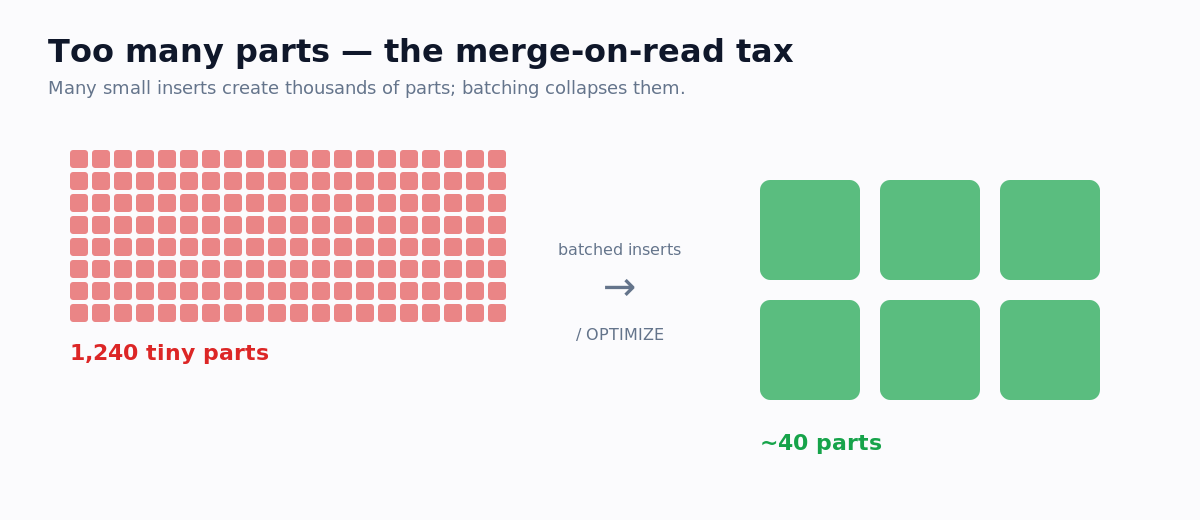
Background threads continuously merge small parts into larger ones (hence the name). The danger is writing parts faster than the merge pool can consolidate them — each part carries fixed overhead, and past a few hundred active parts in a partition you hit the infamous 'Too many parts' error. The fix is almost never to raise the limit; it is to insert in large batches, or enable async_insert so the server batches for you.
The primary key is a sparse index
This is the most misunderstood part of ClickHouse. In a transactional database the primary key indexes every row. In ClickHouse it indexes roughly every 8,192nd row (the default index_granularity). Data inside a part is sorted by ORDER BY and divided into granules; for each granule ClickHouse records the primary-key value of its first row — a 'mark'. The primary index is just that list of marks, small enough to live in memory even for tables with billions of rows.
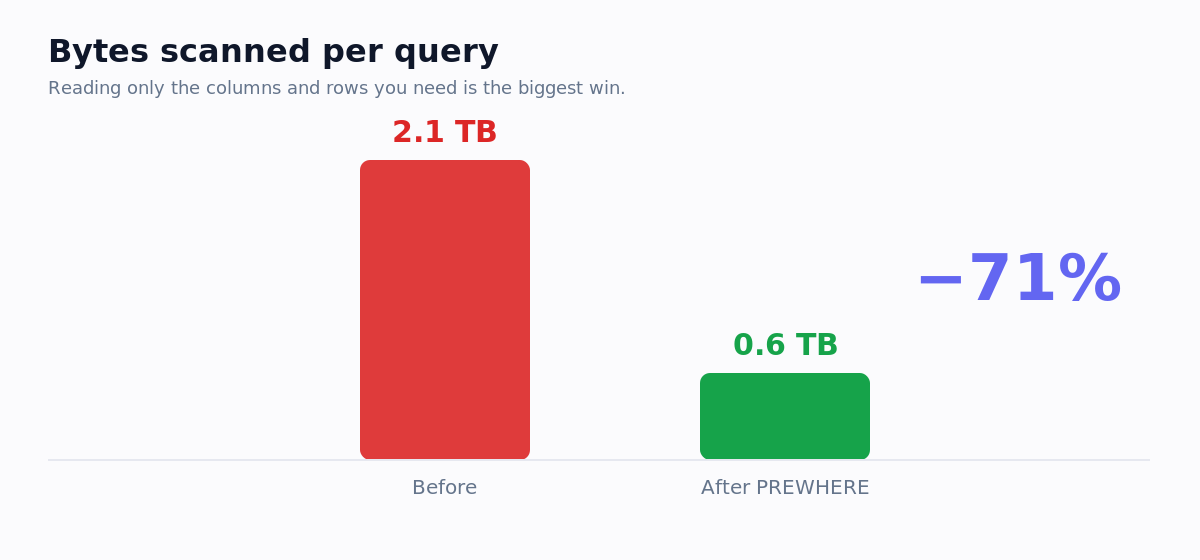
When you filter on primary-key columns, ClickHouse uses the marks to find which granules could match and reads only those. A query touching 10,000 rows out of 10 billion might read two or three granules. That is the whole magic — and it means column order in ORDER BY is everything: the index can only skip data based on the leading columns.
How to choose ORDER BY
- Lead with the columns you filter on most often in WHERE — if 90% of queries filter by event_type, it belongs near the front.
- Order from low to high cardinality where you can: low-cardinality filter columns first (event_type, tenant_id), then higher-cardinality dimensions.
- Put the timestamp last for time-series: (tenant_id, event_type, event_time). This keeps an entity's rows adjacent, which both helps WHERE entity = X and compresses extremely well.
There is a real tension between query pruning (wants your most-filtered column first) and compression (wants low-cardinality, slowly-changing columns first). For most analytical tables these align; when they don't, measure both against your real query mix. By default PRIMARY KEY equals ORDER BY — separate them only to sort more finely than you index, usually for compression.
PARTITION BY is not an index
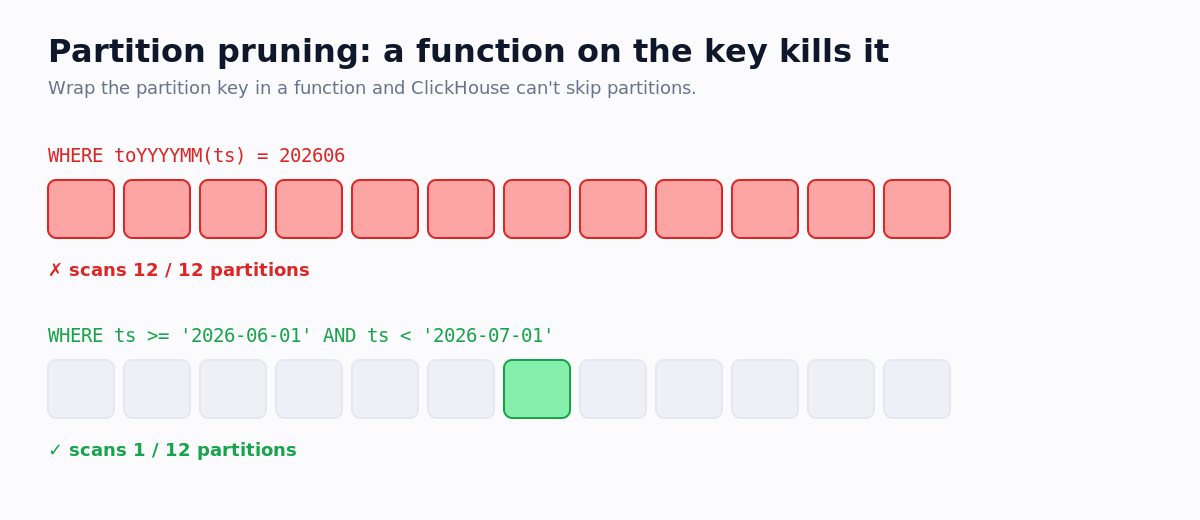
Newcomers reach for PARTITION BY expecting it to speed up queries like an index. It usually does the opposite. Partitioning physically splits a table into independent chunks for data lifecycle management — cheaply dropping old data with DROP PARTITION, TTL expiry, tiered storage. Partition pruning is a coarse side benefit; the primary key already skips data far more finely.
Merges, mutations, and the cost of change
Background merges are the heartbeat of MergeTree — they pick small adjacent parts and rewrite them larger, dropping deleted rows and collapsing duplicates along the way. Mutations (ALTER TABLE ... UPDATE/DELETE) are heavier: because parts are immutable, a mutation rewrites every part containing an affected row, potentially the whole table. Treat them as occasional maintenance, never as transactional updates. If you genuinely need updates or dedup, model them with ReplacingMergeTree or CollapsingMergeTree — and remember those resolve only at merge time.
SELECT * FROM system.merges;

SELECT table, count() AS parts, sum(rows) AS rows
FROM system.parts
WHERE active
GROUP BY table
ORDER BY parts DESC;
A design checklist before you ship a table
- 1SchemaUse the narrowest types that fit — UInt32 over UInt64, Date over DateTime, LowCardinality(String) for under ~10k distinct values. Type width drives both storage and scan speed.
- 2ORDER BYLead with your most common filter columns, put timestamps last, and verify with EXPLAIN indexes = 1 that real queries actually prune granules.
- 3PARTITION BYDefault to none or monthly. Never partition by a high-cardinality column. Add a partition key only for a concrete lifecycle reason.
- 4IngestionInsert in large batches. If you can't, turn on async_insert. Watch system.parts part counts as a health metric, not just disk usage.
FAQ
Is the ClickHouse primary key unique?
No. It is a sparse sorting index, not a uniqueness constraint — ClickHouse will happily store millions of rows with identical key values. For deduplication use ReplacingMergeTree and accept that duplicates resolve only at merge time (or via FINAL at query time).
Do I need PARTITION BY?
Most tables don't. Partitioning is for data lifecycle, not query speed. When you do need it, monthly partitioning (toYYYYMM) is granular enough for the vast majority of workloads.
What causes the 'Too many parts' error?
Inserting faster than background merges can keep up — almost always many small inserts and/or over-partitioning. Fix it by batching large, enabling async_insert, and coarsening partitioning, not by raising the part-count limit. See our deep dive on too many parts.
Audit your MergeTree tables automatically
Reading system.parts and system.columns by hand across dozens of tables gets tedious fast. OptiHouse connects read-only and scans your MergeTree tables for over-partitioning, part-count pressure, weak sort keys, and oversized types — then ranks the findings by the storage and query time they cost. Try the free optimizer or start a 14-day trial.