5 kinds of unused tables hiding in your ClickHouse
Storage rarely grows because of new workloads — it grows because old data never leaves. In most ClickHouse clusters, a large share of disk is held by tables nobody has queried in months. Here are the five usual suspects.
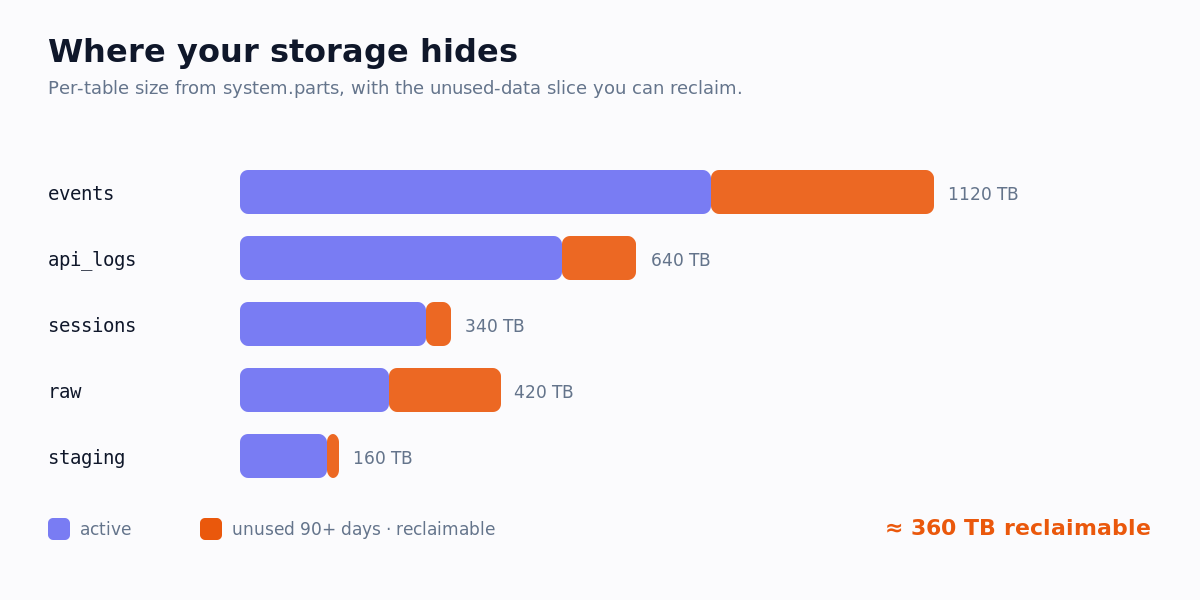
1. Abandoned staging tables
Intermediate tables from a migration or a one-off backfill that were never cleaned up. They often hold a full copy of production data and sit untouched for months.
2. Zombie materialized views
Materialized views whose downstream consumer was removed, but the MV keeps consuming merges and storage on every insert — paying twice for data nobody reads.
3. Backup and snapshot copies
events_backup, orders_2025_old, *_copy — manual safety copies that became permanent. Real backups belong in object storage, not on hot ClickHouse disks.
4. Deprecated rollups
Pre-aggregation tables for dashboards that were replaced or retired. The dashboard is gone; the rollup and its refresh pipeline are still running.
5. Sandbox and one-off analysis tables
Tables created for a single investigation under a personal or sandbox database, never dropped. Individually small, collectively significant across a team.
How to find them
List every table that does not appear in the last 90 days of query_log, then size them from system.parts.
WITH read_tables AS (
    SELECT DISTINCT arrayJoin(tables) AS t
    FROM system.query_log
    WHERE type = 'QueryFinish'
      AND event_time > now() - INTERVAL 90 DAY
)
SELECT p.database, p.table,
       formatReadableSize(sum(p.bytes_on_disk)) AS size
FROM system.parts AS p
WHERE p.active
  AND concat(p.database, '.', p.table) NOT IN (SELECT t FROM read_tables)
  AND p.database NOT IN ('system', 'information_schema')
GROUP BY p.database, p.table
ORDER BY sum(p.bytes_on_disk) DESC;system.part_log that no new parts are arriving before you drop anything.Find and price them automatically
OptiHouse flags unused tables on every read-only scan and converts them into a monthly dollar figure using your storage pricing. Start free — see the full walkthrough in Reducing storage & cost.